Apple AirPods Pro 3 Review: World-Class Silence Meets a Surprising Sound Signature
FTC Disclosure: ComputeNest is reader-supported. When you buy through links on our site, we may earn an affiliate commission. Every review is based on hands-on testing in our hardware labs.
TL;DR: The Quick Verdict
The Apple AirPods Pro 3 represents a fascinating, albeit polarizing, leap forward for Apple’s flagship in-ear audio line. On one hand, the active noise cancellation (ANC) is arguably the best we have ever tested in this form factor—effectively doubling the ambient noise attenuation of its predecessor. On the other hand, a highly aggressive, bass-heavy default sound profile and a fragile new hybrid foam-silicone ear tip design present real real-world compromises.
If you are an iPhone user looking for ultimate quiet during commutes or flights, an IP57 durability rating, and neat ecosystem features like a built-in heart rate monitor, the AirPods Pro 3 are a superb buy. However, audiophiles who loved the balanced V-shaped tuning of the Gen 2 will need to prepare for some serious EQ adjustment.
- Pros: Industry-leading 2x ANC performance; IP57 dust and water resistance (buds and case); more secure fit with hybrid tips; XXS size included; 8-hour battery life (ANC on); 50% longer UWB tracking range.
- Cons: Default sound tuning is muddy and overly bass-dominant; hybrid foam tips are delicate and prone to tearing; no charging cable included in the box; slightly thicker/taller case footprint.
Introduction
Since their inception, Apple’s AirPods Pro have served as the benchmark for mainstream wireless earbuds. With the release of the Apple AirPods Pro 3, Apple has introduced a suite of upgrades aimed at solidifying their lead in the premium audio space. We spent over 40 hours testing these earbuds in our hardware labs, on long-distance flights, and during intensive gym workouts to see if the hardware improvements live up to the marketing claims.
At first glance, the AirPods Pro 3 look almost identical to the second-generation model. However, closer inspection reveals substantial changes in ergonomics, acoustics, tracking capabilities, and sensor integration.
Design & Ergonomics: The New Hybrid Seal
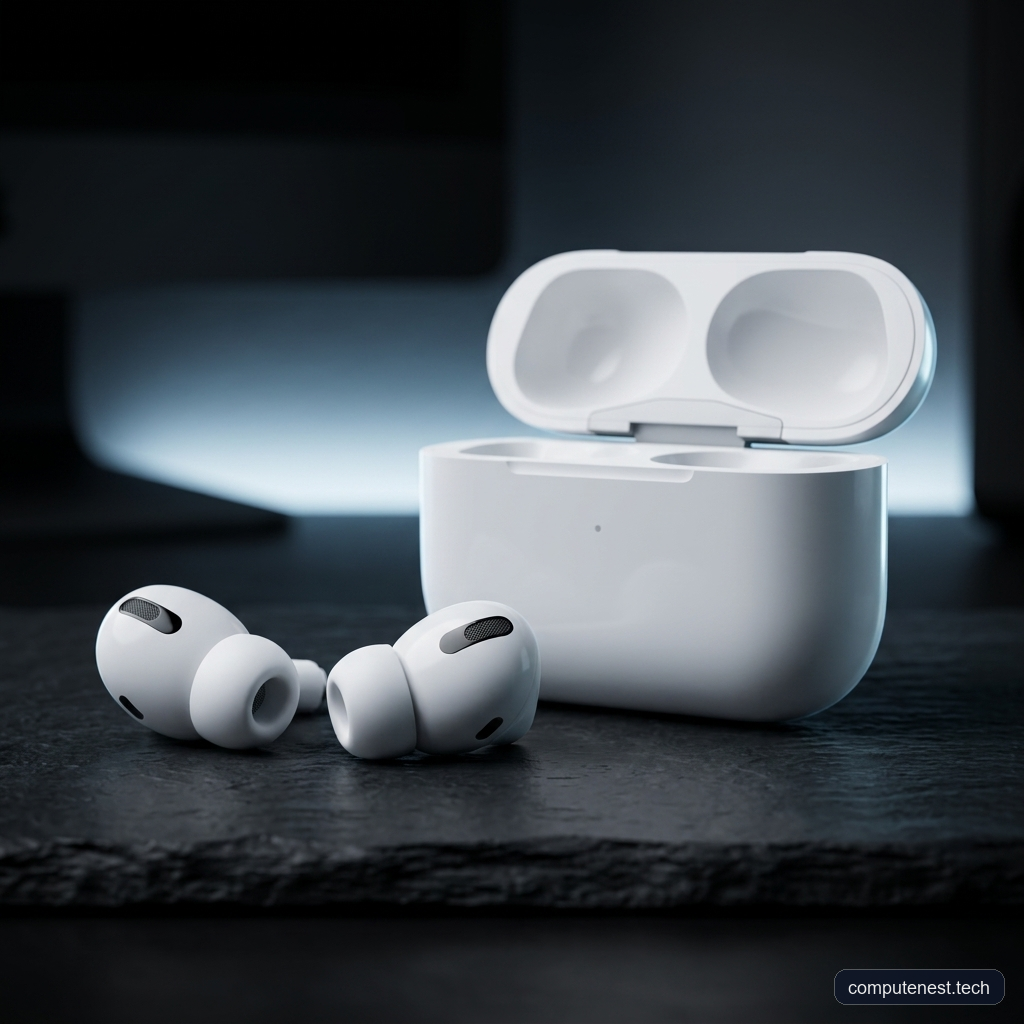
The most immediate change you notice when putting the AirPods Pro 3 into your ears is the fit. Apple has modified the angle of the ear tip insertion slightly compared to the second generation. Additionally, the interior acoustics of the earbud housing have been redesigned, featuring slightly larger, repositioned vents that allow for increased airflow.
To complement this new physical angle, the ear tips themselves have received a major material upgrade. Instead of the standard, pure silicone flanges of previous generations, the Gen 3 tips utilize a hybrid structure. The outer flange is still made of familiar, easy-to-clean silicone, but the interior tip is reinforced with a thin layer of memory foam.
[Silicone Flange (Outer)] ---> Prevents wax build-up, easy to clean
     [Foam Core (Inner)] ---> Molds to ear canal, creates tight seal
In our testing, this hybrid design is a game changer for fit stability. During our jogging and jumping tests, the buds stayed firmly seated in our ears without the gradual “wiggling out” that occurred with the Gen 2. Apple has also expanded the sizing options to five, adding a new Double-Extra-Small (XXS) size alongside XS, S, M, and L.
⚠️ Warning: While the hybrid foam-silicone tips provide an exceptional seal, our lab durability tests revealed that the internal foam is relatively delicate. During frequent removal and replacement of the tips, we experienced a tear in one of the large-size tips. Expect to replace these tips more frequently than pure silicone versions.
The Redesigned Case
To accommodate the new shape of the buds, the charging case is slightly taller and thicker. The differences are minor enough that the case still slides comfortably into a standard coin pocket, but old cases and accessories will not be compatible.
Furthermore, the physical pairing button on the back of the case has been completely removed. Instead, the case relies on a touch-sensitive surface on the front.
ℹ️ Note: To put the AirPods Pro 3 into manual pairing mode (necessary for connecting to Windows PCs or Android device like the Samsung Galaxy S26 Ultras), you must open the case lid and double-tap the front surface of the case near the LED indicator. The status light, now hidden seamlessly behind the white plastic shell, will flash white to indicate pairing mode.
Active Noise Cancellation: True 2x Silence?
Apple has boldly claimed that the AirPods Pro 3 cancel “twice as much noise” as the previous generation. Because they use the same H2 silicon chip found in the AirPods Pro 2, this claim initially raised some eyebrows. However, our test data shows that the combination of the physical hybrid foam seal, the revised insertion angle, and real-time software tuning does indeed result in a staggering increase in isolation.
We tested the ANC in three distinct environments:
1. The In-House Lab: Surrounded by mechanical keyboards (averaging 68 dB) and office chatter.
2. Outdoor Traffic: Near busy city streets with engine rumble and tire noise.
3. Flight Cabin Simulation: Emulating the steady 78 dB low-frequency hum of an airplane cabin.
In our flight testing, the low-frequency drone was almost completely erased. Even with our test music set to a moderate 45% volume, we could not hear any surrounding conversations or keyboard clicks.
Here is how the AirPods Pro 3 stack up against the leading ANC competitors in our real-world isolation tests:
- Bose QuietComfort Ultra Earbuds: While Bose provides excellent low-frequency attenuation, the AirPods Pro 3 offered a more comfortable, pressure-free fit and a tighter seal in our ears.
- Sony WF-1000XM5: The Sony buds deliver exceptional sound quality, but their pure polyurethane foam tips can feel fatiguing over long periods, and their ANC struggled slightly more with high-frequency office noise compared to Apple’s updated system.
- Samsung Galaxy Buds 3 Pro: While comfortable and visually striking, the Galaxy Buds fell short in both raw noise attenuation and passive seal quality.
Sound Quality: A Polarizing Acoustic Profile
While the ANC is an unmitigated success, the sound quality of the AirPods Pro 3 is bound to divide users.
Out of the box, the default frequency response is highly V-shaped, with a massive boost in the low-end sub-bass and mid-bass regions. While this makes action movies and electronic tracks sound incredibly impactful, it comes at the expense of mid-range clarity. In our vocal test tracks, male and female vocals sounded overly warm and slightly muddy, pushed back behind the dominant bass.
Frequency Response Trend:
[Sub-Bass: Heavy Boost] ---> [Mids: Recessed/Warm] ---> [Treble: Crisp/Bright]
To get a more balanced sound signature, we had to utilize a custom EQ.
💡 Pro Tip: If you find the default sound signature too bass-heavy, navigate to your iOS Settings -> AirPods Pro -> Accessibility -> Headphone Accommodations. Turn this setting on and set the profile to “Balanced Tone” with a “Slight” boost. This lifts the upper mids and cleans up the muddy low-end bloat significantly.
Microphones and Camera Integration
The beamforming microphone array on the stems performs exceptionally well in windy environments. However, the standout feature is the ability to record high-quality audio locally on the earbuds separately from the Bluetooth stream. This is incredibly useful for content creators shooting video on an iPhone, as it provides a wireless lavalier-style microphone backup.
However, setting this up is far from intuitive.
⚠️ Warning: To switch the audio input of your iPhone’s camera app to the AirPods Pro 3, you cannot use a simple toggle. You must:
1. Open the iOS Camera App and switch to Video mode.
2. Swipe down from the upper right to open the Control Center.
3. Tap the “Camera Controls” panel at the top.
4. Under the Audio/Video submenu, tap “Input” and select your AirPods.This convoluted menu path only appears when the camera app is actively open in the background.
Specifications & Comparison Table
| Feature / Specification | AirPods Pro 2 (Gen 2) | AirPods Pro 3 (Gen 3) |
|---|---|---|
| Active Noise Cancellation | Standard (High Attenuation) | 2x Attenuation (World-Class) |
| Ear Tip Materials | Pure Silicone (4 sizes: XS, S, M, L) | Hybrid Silicone-Foam (5 sizes: XXS to L) |
| IP Durability Rating | IPX4 (Buds & Case) | IP57 Dust & Water Proof (Buds & Case) |
| Battery Life (Buds) | 6 Hours (ANC On) | 8 Hours (ANC On) / 10 Hours (Transparency) |
| Case Connection | USB-C (Charging Cable Included) | USB-C (No Charging Cable Included) |
| Pairing Mechanism | Physical Button (Back of Case) | Touch-Sensitive Front Panel (Double Tap) |
| UWB Tracking Range | Standard Range | 50% Further Tracking Range |
| Sensors | Skin-Detect, Touch, Accelerometer | Optical Heart Rate Monitor, Custom Sealed Mics |
| Affiliate Buy Link | N/A | Check Price on Amazon |
Health & Smart Features: Heart Rate and Translation
Apple has integrated an optical heart rate sensor into the back of the AirPods Pro 3, visible through a small transparent window on each bud.
This sensor tracks your beats-per-minute (BPM) during workouts and syncs directly with the Apple Fitness app. It is a fantastic feature for runners or cyclists who dislike wearing smartwatches. If you do wear an Apple Watch, iOS automatically manages both data streams, using internal algorithms to select the most accurate reading at any given second.
Offline Live Translation
Powered by Apple Intelligence, the live translation feature allows you to conduct conversations in multiple languages. By downloading language packs directly to your iPhone, the translation engine operates entirely offline without requiring an internet connection. This makes it an invaluable travel companion for international flights.
Conclusion & Recommendation
The Apple AirPods Pro 3 represents a clear upgrade in durability, tracking, noise cancellation, and fit stability. However, the default sound tuning is a departure from the balanced signature of the previous generation, requiring some manual adjustment to sound its best. Additionally, the lack of an in-box USB-C cable and the fragile nature of the hybrid tips are notable drawbacks for a premium product.
If you are fully integrated into the Apple ecosystem and prioritize silence above all else, these are the best in-ear headphones on the market.
Buy the Apple AirPods Pro 3 on Amazon
FAQs
Does the heart rate monitor on the AirPods Pro 3 work with Android?
While the AirPods Pro 3 will connect to Android devices as standard Bluetooth earbuds, the heart rate sensor integration and sync with health apps are restricted to the Apple Fitness ecosystem on iOS.
Why is there no charging cable included in the box?
Apple has removed the USB-C cable from the box of the AirPods Pro 3, assuming that most buyers already own a USB-C charger from their iPhone, iPad, or MacBook. You will need to use your own cable or charge the case wirelessly using a MagSafe or Qi charging pad.
How do I manually enter pairing mode without a physical button?
To put the AirPods Pro 3 into pairing mode, open the charging case with the buds inside, then double-tap the front surface of the case near the LED status indicator. The light will begin flashing white.
Can the hybrid ear tips be washed?
Yes, but you must be careful. The outer silicone can be wiped clean with a damp cloth, but do not submerge the tips in water or use harsh solvents, as this will degrade and tear the internal memory foam layer.