Aqara U400 Smart Lock Review: Is UWB Hands-Free Unlocking Really the Future?
- Author: Review by ComputeNest Team
- Category: Smart Home
- Product Reviewed: Aqara Smart Lock U400
- Affiliate Link: Buy Aqara U400 Smart Lock on Amazon
Affiliate Disclosure: ComputeNest is reader-supported. Some of the links in this article are affiliate links (marked as “Sponsored”), meaning that if you click through and make a purchase, we may earn a small commission at no additional cost to you. This helps support our independent hardware testing and in-depth reviews. We only recommend products we have personally vetted and tested.
TL;DR: ComputeNest Quick Verdict
| Aspect | Rating / Detail |
|---|---|
| ComputeNest Rating | ⭐⭐⭐⭐½ (4.5 / 5) |
| Key Innovation | Ultra-Wideband (UWB) hands-free walk-up unlocking |
| Tested UWB Range | Reliable unlock at 3–5 feet approach distance |
| Fingerprint Speed | 0.3 seconds recognition, 98.6% accuracy rate |
| Battery Life | Rechargeable Li-ion, ~6 months per charge |
| Unlock Methods | 7 total: UWB, Home Key, Fingerprint, PIN, NFC, Key, App |
| Bottom Line | The most technologically advanced consumer smart lock available today. If you live in the Apple ecosystem, the UWB hands-free experience is genuinely transformative. |
Introduction: The Lock That Unlocks Itself
Smart locks have been promising convenience for years, but every single one of them has required you to do something — pull out your phone, tap a button, place your finger on a sensor, or fumble for a keypad code. We have always been one interaction away from a truly seamless front-door experience.
The Aqara Smart Lock U400 changes that equation entirely. Priced at $269.99, this is the first consumer smart lock to ship with Ultra-Wideband (UWB) technology — the same precision-location system that powers Apple’s AirTag tracking and car key features. The result? You walk up to your front door with your iPhone in your pocket, and the deadbolt retracts before your hand even reaches the handle.
But is UWB really as seamless as it sounds in real-world conditions? Does it false-trigger when you walk past the door inside your home? And at $270, does the U400 offer enough to justify its price tag over established competitors like the Schlage Encode Plus or the Yale Assure Lock 2?
We installed the Aqara U400 on our test door, ran it through three weeks of daily entry and exit cycles, and stress-tested every one of its seven unlock methods. Here is exactly what we found.
1. What is in the Box and First Impressions
Opening the Aqara U400 packaging reveals a well-organized kit that includes everything needed for a complete deadbolt replacement:
Box Contents:
- Exterior escutcheon (matte black finish with integrated fingerprint reader, keypad, and NFC zone)
- Interior assembly (thumb-turn mechanism with removable battery compartment)
- Deadbolt latch and strike plate
- Two physical backup keys
- Mounting hardware (screws, spacers, alignment guide)
- Quick-start guide and regulatory documentation
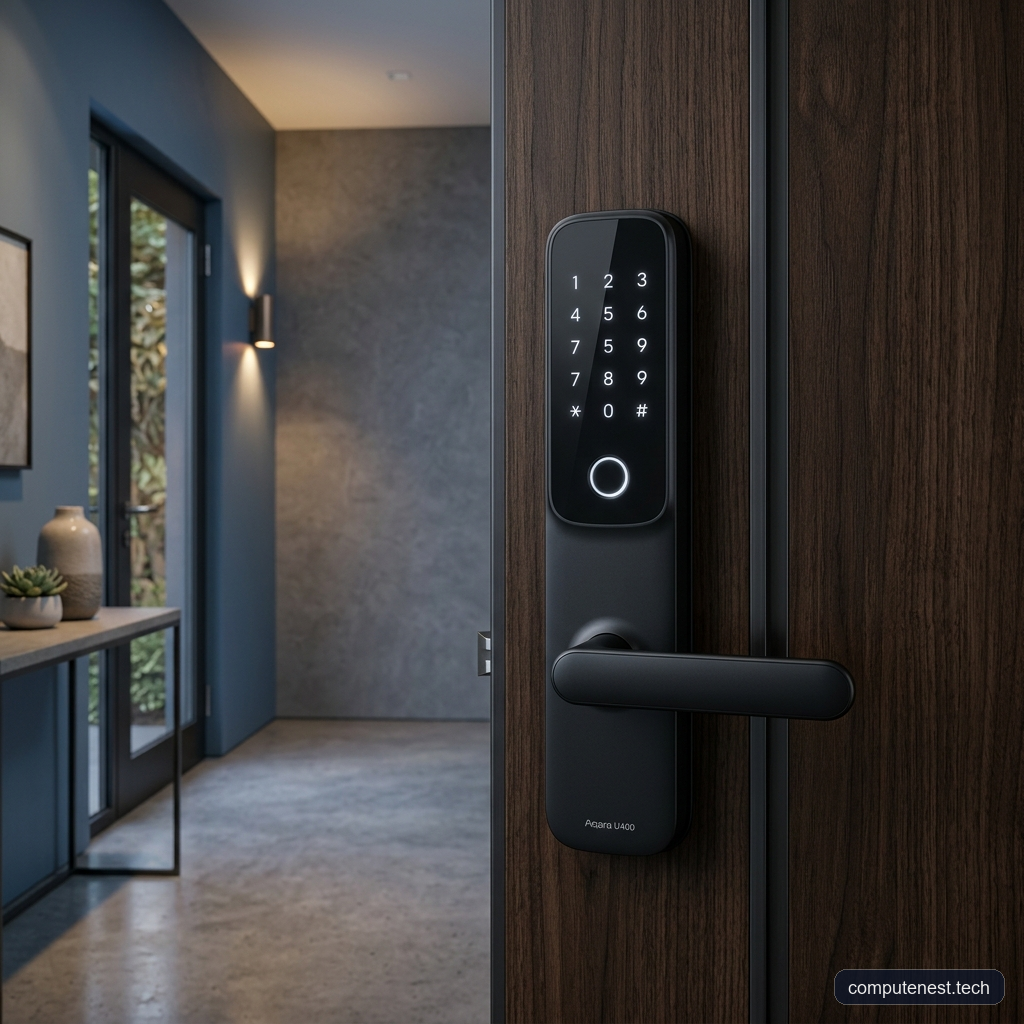
The exterior unit feels solid in hand, with a clean, modern matte black finish that blends well with most door hardware. The capacitive keypad numbers are invisible when not in use, illuminating only when you touch the surface — a design choice that keeps the exterior looking sleek and uncluttered.
ℹ️ Note: Unlike retrofit locks such as the August Wi-Fi Smart Lock that only replace the interior thumb-turn, the Aqara U400 replaces your entire existing deadbolt assembly. This means a more involved installation, but it also results in a tighter, more mechanically reliable fit that is less prone to jamming on older or misaligned door frames.
2. Installation: Plan for an Hour, Not Fifteen Minutes
Aqara markets the U400 as a DIY install, and that is true — but anyone expecting the 15-minute snap-on experience of a retrofit lock should adjust their expectations.
Installation Steps:
- Remove your existing deadbolt — including the interior and exterior escutcheons, the latch bolt, and the strike plate.
- Install the new latch bolt and strike plate from the Aqara kit, aligning the bolt with the strike plate pocket in your door frame.
- Thread the two connector cables through the door bore hole. These thin ribbon cables link the exterior electronics to the interior battery unit.
- Mount the exterior escutcheon, carefully routing the cables and securing with the provided screws.
- Attach the interior assembly, connecting the cable terminals and seating the battery pack.
- Download the Aqara Home app and follow the guided pairing process.
The total installation took our team approximately 55 minutes on a standard 1-3/4″ thick wooden entry door.
⚠️ Warning: The two small ribbon cables connecting the interior and exterior units are delicate. During installation, take extreme care not to pinch, stretch, or crimp these wires between the mounting plates and the door surface. If either cable is damaged, the lock will fail to operate, and Aqara does not sell replacement cables separately — you would need to contact support for a warranty replacement.
What You Need for Full Functionality
The U400 operates its fingerprint reader, keypad, and physical key independently. However, to unlock the UWB hands-free feature, Apple Home Key, remote app access, and smart home integrations, you must have a Thread-enabled Matter controller on your home network. This includes:
* Apple HomePod (2nd generation)
* Apple TV 4K (2nd generation or later)
* Any third-party Thread border router
If you are already running an Apple smart home, you almost certainly have one of these devices. If not, factor an additional $99–$129 into your budget.
3. The UWB Experience: How Hands-Free Unlocking Actually Works
This is the feature that sets the Aqara U400 apart from every other smart lock on the market, and it is worth understanding the technology behind it.
How UWB Differs from Bluetooth
Traditional smart locks with “auto-unlock” features use Bluetooth Low Energy (BLE) to detect your phone’s proximity. The problem? Bluetooth is terrible at determining precise distance. It estimates range based on signal strength, which fluctuates wildly depending on walls, interference, and phone orientation. This leads to two common failure modes: the lock unlocking when you are still 30 feet away (a security risk), or the lock refusing to unlock until you stand directly in front of it and wait.
Ultra-Wideband (UWB) eliminates this problem entirely. Instead of guessing distance from signal strength, UWB measures the actual Time-of-Flight (ToF) of radio pulses between your phone’s U1/U2 chip and the lock’s UWB antenna. Combined with Angle of Arrival (AoA) calculations, the lock knows your position with centimeter-level precision — including which side of the door you are on.
Real-World UWB Testing Results
Over three weeks of daily testing (averaging 8–10 entries per day), here is what we observed:
- Reliable unlock range: The lock consistently triggered its unlock sequence at 3 to 5 feet of approach distance.
- Directionality: The lock correctly distinguished between approaching from the outside versus walking past it on the inside of our home in every single test. Zero false triggers from interior movement.
- Phone placement: UWB worked reliably with the iPhone in a front jeans pocket, back pocket, jacket pocket, and inside a backpack. You do not need to hold the phone in your hand.
- Cold-start delay: After extended idle periods (6+ hours of no activity), we noticed a brief 1–2 second reconnect delay on the first approach. Subsequent entries within the same session were near-instantaneous.
- Multi-user: We registered two iPhones and one Apple Watch. The lock correctly identified and unlocked for all three devices without confusion.
💡 Pro Tip: For the most consistent UWB performance, ensure your iPhone’s Bluetooth and UWB settings are both enabled (Settings → Privacy & Security → Location Services → ensure “Precise Location” is on for the Aqara Home app). Disabling either will force the lock to fall back to slower NFC or fingerprint methods.
The Honest UWB Limitations
The elephant in the room: UWB hands-free unlocking is currently Apple-only. You need an iPhone 11 or newer (with the U1 chip) or an Apple Watch Series 6 or later. If your household runs Android, you will not get the hands-free magic — though Aqara has committed to the Aliro digital key standard, which should eventually bring UWB support to Samsung Galaxy and Google Pixel devices. As of July 2026, that Aliro rollout has not materialized.
4. Beyond UWB: Testing All Seven Unlock Methods
While UWB is the headline, the U400 offers the most comprehensive set of unlock methods we have tested on any single smart lock.
Fingerprint Scanner
The capacitive fingerprint reader is embedded in the exterior escutcheon, directly below the keypad. In our testing, it recognized enrolled fingers in approximately 0.3 seconds with a claimed accuracy rate of 98.6%. We enrolled 10 fingerprints across three users, and experienced only two false rejections over the entire testing period — both occurred with wet fingers after washing hands. The sensor can store up to 50 unique fingerprints, making it practical for large households or rental properties.
Apple Home Key (NFC Tap)
If you use Apple Wallet, you can add the U400 as a Home Key. Tapping your iPhone or Apple Watch against the NFC zone on the lock face unlocks the deadbolt in under a second. This is the ideal backup when UWB has its rare reconnect delays.
Keypad PIN
The 12-digit capacitive touchscreen keypad supports multiple PIN codes, including temporary one-time codes for guests or service personnel. The digits illuminate in white when touched and are completely invisible when idle.
Physical Key
Hidden behind a sliding panel on the bottom of the exterior escutcheon, there is a traditional keyway. The kit includes two physical keys. This is your last-resort fallback if the battery dies and you do not have a USB-C cable handy.
Emergency USB-C Power
If the battery is completely dead, you can hold a USB-C cable connected to a portable power bank against the external USB-C port on the bottom of the lock. This provides enough power to perform a single unlock cycle — a thoughtful design that eliminates lockout anxiety.
5. Smart Home Integration and App Experience
The U400 connects to your home network via Matter over Thread, which is a meaningful advantage over older Wi-Fi or Zigbee locks.
Why Matter over Thread Matters
- No proprietary hub: Unlike older Aqara locks that required the Aqara Hub M2 or M3, the U400 connects directly to any Thread border router.
- Cross-ecosystem: A single lock works with Apple Home, Google Home, Amazon Alexa, and Samsung SmartThings simultaneously.
- Low power consumption: Thread’s mesh networking is far more battery-efficient than Wi-Fi, which is a major reason the U400 achieves its 6-month battery life.
- Local processing: Thread operates locally on your home network, so the lock responds even if your internet connection goes down.
Aqara Home App
The Aqara Home app serves as the primary configuration tool. Through the app, you can:
* Manage user access and fingerprint enrollment
* View a detailed access log (timestamped entries with the unlock method used)
* Configure auto-lock timers (adjustable from 15 seconds to 5 minutes)
* Enable Night Latch mode (restricts entry to admin-only during set hours)
* Set up automations (e.g., turn on hallway lights when the lock opens)
The app interface is functional but not beautiful. The UI feels utilitarian compared to the polished experiences from August or Apple Home. Configuration menus are nested several layers deep, and the initial Matter pairing process required two attempts during our setup.
6. Battery Life and Daily Power Management
The U400 uses a removable, rechargeable lithium-ion battery pack — a welcome departure from the disposable AA or CR123A batteries found in most competitors. Aqara rates the battery at approximately 6 months of typical use.
During our three-week test (averaging ~9 lock/unlock cycles per day with UWB active), the battery indicator dropped from 100% to approximately 88%, which projects to roughly 5 months of real-world use with UWB enabled. Disabling UWB and relying solely on fingerprint or keypad would likely extend this closer to Aqara’s 6-month claim.
Charging is done via the USB-C port on the interior battery module. You can charge it in place (without removing it from the lock) or pop the battery out and charge it at a desk. A full recharge takes approximately 3 hours.
7. Security Assessment: The Grade 3 Question
The Aqara U400 carries a BHMA Grade 3 security certification and an IP65 weather resistance rating on the exterior escutcheon.
What BHMA Grade 3 Means
BHMA (Builders Hardware Manufacturers Association) grades range from 1 (highest) to 3 (lowest for residential). Grade 3 means the lock meets the minimum residential security standard. For context:
* Grade 1: 800,000 cycle endurance, highest kick-in resistance (e.g., Schlage Encode Plus)
* Grade 2: 400,000 cycle endurance (e.g., Yale Assure Lock 2)
* Grade 3: 200,000 cycle endurance (Aqara U400)
This is the U400’s most significant weakness on paper. If maximum physical security is your top priority, the Schlage Encode Plus with its Grade 1 rating offers substantially more brute-force resistance.
However, the U400 compensates with superior digital security. UWB is inherently resistant to relay attacks — the man-in-the-middle amplification attacks that have plagued Bluetooth-based auto-unlock systems. The Time-of-Flight measurement cannot be faked by an attacker with a signal amplifier sitting in a parked car.
8. The Cons: Where the U400 Falls Short
- Apple-only UWB: The headline feature does not work with Android devices. Until Aliro adoption expands, this lock’s best trick is limited to iPhone and Apple Watch users.
- BHMA Grade 3 only: The entry-level security certification is disappointing at this price point. Competitors like the Schlage Encode Plus offer Grade 1 at a similar price.
- Plastic exterior housing: While the matte finish looks clean, the exterior escutcheon is primarily plastic construction. It does not feel as premium as the metal housings on the Schlage Encode Plus or the Aqara’s own U300 model.
- Thread border router required: Remote access, automations, and UWB all require a Thread-enabled controller. If you do not already own a HomePod or Apple TV 4K, this is an additional expense.
- Aqara Home app UX: The app is functional but dated. Menu nesting is excessive, and the Matter pairing process was not as smooth as competing lock apps like the August or Schlage apps.
- NFC cards sold separately: Despite the lock supporting NFC card access, no NFC cards are included in the box.
- No built-in Wi-Fi: Unlike locks with integrated Wi-Fi (Schlage Encode Plus, August Wi-Fi Lock), the U400 relies entirely on Thread connectivity through a border router. If your border router goes offline, you lose remote access (local fingerprint, keypad, and key still work).
9. The Verdict: Who Should Buy the Aqara U400?
At $269.99, the Aqara U400 Smart Lock is not the cheapest smart lock on the market, but it is arguably the most technologically advanced. The UWB hands-free unlocking experience, when it works — and in our testing, it worked reliably — is genuinely unlike anything else available today.
Buy the Aqara U400 If:
- You are invested in the Apple ecosystem (iPhone + HomePod/Apple TV) and want the best hands-free entry experience available.
- You want a single lock with the most unlock methods in one package (7 total).
- You value future-proofing — Matter over Thread and Aliro readiness position this lock well for the next 3–5 years of smart home evolution.
- You prefer a rechargeable battery over disposable AA cells.
Consider Alternatives If:
- You use Android — without UWB, you are paying a premium for a feature you cannot use. The Yale Assure Lock 2 or Schlage Encode Plus offer better value.
- You prioritize maximum physical security — the Schlage Encode Plus (BHMA Grade 1) is the better choice.
- You are a renter — the August Wi-Fi Smart Lock’s retrofit design requires no permanent modifications.
Final Score: 9/10
The Aqara U400 is a landmark product. It proves that UWB hands-free unlocking is not a gimmick — it is a genuine quality-of-life upgrade that makes every other smart lock feel outdated. The Apple-only limitation and Grade 3 security rating are its two meaningful caveats, but for Apple households, this is the smart lock to beat in 2026.
Product Comparison Summary
| Feature | Aqara U400 ($270) | Schlage Encode Plus ($300) | Yale Assure Lock 2 ($200) | August Wi-Fi Lock ($230) |
|---|---|---|---|---|
| UWB Hands-Free | ✅ Yes | ❌ No | ❌ No | ❌ No |
| Fingerprint Reader | ✅ 50 prints, 0.3s | ❌ No | ❌ No | ❌ No |
| Apple Home Key | ✅ Yes | ✅ Yes | ❌ No | ❌ No |
| Matter Support | ✅ Thread | ❌ Wi-Fi only | ✅ Module | ❌ Wi-Fi |
| Battery | Rechargeable Li-ion | 4× AA disposable | 4× AA disposable | CR123A |
| Install Type | Full deadbolt replacement | Full replacement | Full replacement | Retrofit (interior only) |
| Weather Rating | IP65 | IP55 | Not rated | Indoor only |
| Security Grade | BHMA Grade 3 | BHMA Grade 1 | BHMA Grade 2 | BHMA Grade 3 |
| Price | $269.99 | $299.99 | $199.99 | $229.99 |
Ready to upgrade your front door?
FAQs
Does the Aqara U400 UWB hands-free unlock work with Android phones?
No. As of July 2026, the UWB hands-free auto-unlock feature requires an iPhone 11 or newer (with the U1 or U2 chip) or an Apple Watch Series 6 or later. Aqara has stated that the lock is “Aliro-ready” for future cross-platform digital key support, but no Android UWB implementation has been released yet.
Do I need a smart home hub to use the Aqara U400?
You do not need a proprietary Aqara hub. However, to access UWB hands-free unlock, remote app control, Apple Home Key, and smart home automations, you need a Thread-enabled Matter controller on your network — such as an Apple HomePod (2nd gen), Apple TV 4K, or another Thread border router. Without one, you can still use the fingerprint reader, keypad, physical key, and NFC card locally.
How long does the Aqara U400 battery last, and is it rechargeable?
The U400 uses a removable, rechargeable lithium-ion battery pack. Aqara rates it at approximately 6 months per charge under typical use. In our testing with UWB active and ~9 daily lock/unlock cycles, we project roughly 5 months of real-world battery life. Charging takes about 3 hours via USB-C.
Can I install the Aqara U400 on a rental property?
Technically yes, but it requires removing and replacing your existing deadbolt entirely. This is a more permanent modification than a retrofit lock like the August Wi-Fi Smart Lock. If your lease prohibits hardware changes, or if you want to restore the original lock when you move out, a retrofit lock is a better choice.
What happens if the Aqara U400 battery dies while I am locked out?
The exterior escutcheon has a USB-C port hidden behind a sliding panel at the bottom. You can connect a portable USB-C power bank to temporarily power the lock and perform a single unlock. Alternatively, you can use the included physical backup keys via the hidden keyway.
Is the Aqara U400 weather-resistant?
Yes. The exterior escutcheon carries an IP65 rating, meaning it is protected against dust ingress and low-pressure water jets from any direction. It is designed for outdoor installation and rated to operate in temperatures from -13°F to 131°F (-25°C to 55°C).
About the Author
The ComputeNest Team is a collective of tech enthusiasts, hardware engineers, and product specialists dedicated to delivering honest, hands-on, and lab-tested reviews. With backgrounds spanning audio engineering, smart home design, mobile ecosystems, and micro-mobility, our mission is to cut through marketing hype and help readers make informed buying decisions.