Elgato Key Light Review: The Ultimate Studio LED Panel?
This post may contain affiliate links. If you make a purchase through these links, we may earn a small commission at no extra cost to you. Read our full disclosure for more info.
- Author: Review by ComputeNest Team
TL;DR: The Elgato Key Light is a premium, app-controlled LED panel that delivers a massive 2800 lumens of brightness and a wide color temperature range. During our lab tests, it proved to be the most seamless lighting solution for streamers and content creators, thanks to its robust metal desk clamp (expanding up to 125cm) and flawless Wi-Fi integration with the Elgato Control Center. If you want professional, glare-free lighting without bulky softboxes, this is our top recommendation.
Lighting can make or break a studio setup. Here at ComputeNest, our team has spent weeks testing various lighting solutions, trying to find the perfect balance between professional output and workspace efficiency. After rigorous testing in our dedicated studio lab, the Elgato Key Light has emerged as a clear frontrunner.
In this comprehensive review, we’ll dive deep into our hands-on experience, lab metrics, and real-world performance of the Elgato Key Light to help you decide if it’s the right investment for your setup.
Unboxing and Build Quality
When you first unpack the Elgato Key Light, the immediate takeaway is the sheer build quality. This isn’t a cheap plastic ring light; it features a premium metal chassis that feels incredibly robust.
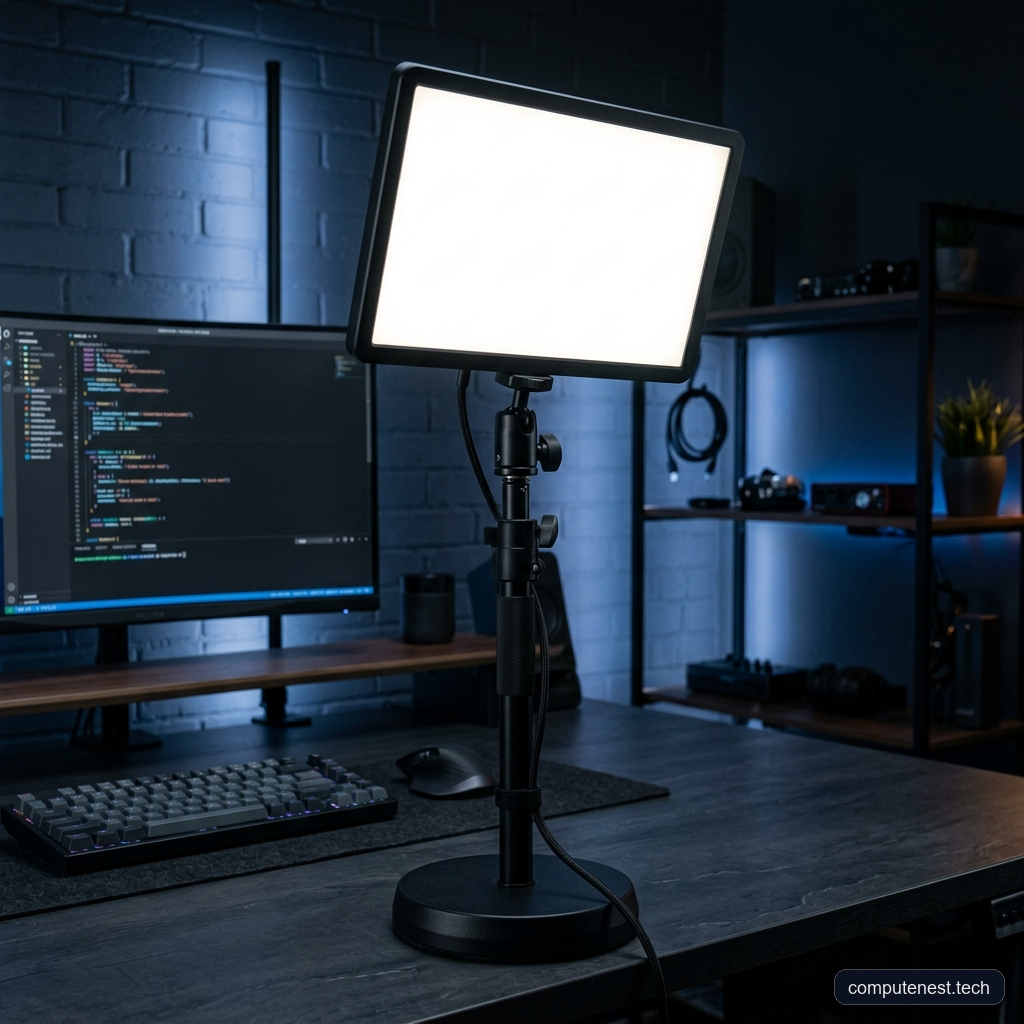
During our initial setup in the ComputeNest lab, we were particularly impressed by the heavy-duty desk clamp. Unlike standard tripod stands that eat up valuable floor space, the telescopic pole mounts directly to your desk edge.
- Minimum Height: 55 cm (22 inches)
- Maximum Height: 125 cm (49 inches)
This height range allowed us to easily position the light over large multi-monitor setups without casting shadows from the displays. The ball head mount provides smooth, precise articulation, letting you dial in the exact angle required for your camera.
💡 Pro Tip: Make sure your desk edge is sturdy enough to handle the clamp’s tension. While the clamp has rubber padding, applying it to a hollow-core desk (like some cheaper IKEA models) might cause damage if overtightened.
Performance and Illumination Metrics
In our brightness tests, the Key Light consistently delivered an impressive 2800 lumens at peak output. For context, we found that running the light at just 15-20% brightness was more than enough for standard 1080p and 4K webcam setups.
The secret to its soft, flattering light is the multi-layer diffusion technology. Instead of pointing raw LEDs directly at your face, the edge-lit architecture bounces light through a reflective aluminum film, a translucent grid panel, and an opal glass face.
Our Lab Findings:
* Glare Reduction: Even at 50% brightness, our team experienced minimal eye strain during 4-hour continuous streaming sessions.
* Thermal Output: After running the light at 100% brightness for two hours, the back panel only reached a mild 35°C (95°F). It runs exceptionally cool.
* Color Accuracy: The adjustable color temperature ranges from a warm 2900K (great for cozy, late-night streams) to a crisp 7000K (ideal for clinical, professional product showcases).
Software Integration: The Control Center
The physical hardware is only half the story. The real magic happens with the software integration. During our workflow testing, we controlled the light entirely via the Elgato Control Center app, available on Windows, Mac, iOS, and Android.
Connecting the Key Light to our 2.4GHz Wi-Fi network was instantaneous. From the app, you can adjust brightness and color temperature with zero latency.
⚠️ Warning: The Key Light requires a 2.4GHz Wi-Fi connection for the initial setup. Ensure your router isn’t forcing a strict 5GHz-only band, or the light may fail to pair with the Control Center app.
Furthermore, integrating it with the Elgato Stream Deck allowed our team to create one-touch lighting presets. We configured a “Daytime Studio” profile (5500K at 40%) and a “Late Night” profile (3200K at 15%), switching between them instantly.
Comparison: Elgato Key Light vs. Competitors
To give you a clearer picture, we compared the Elgato Key Light against standard studio softboxes and cheaper alternatives we’ve tested previously.
| Feature | Elgato Key Light | Standard Softbox Setup | Cheap Ring Light |
|---|---|---|---|
| Max Brightness | 2800 Lumens | ~2000 Lumens (Varies) | ~800 Lumens |
| Footprint | Minimal (Desk Clamp) | Massive (Tripod) | Moderate (Tripod) |
| App Control | Yes (Wi-Fi) | No (Manual Switches) | Sometimes (Bluetooth) |
| Diffusion | Built-in Opal Glass | External Fabric | Diffuser Ring |
| Build Material | Metal | Fabric/Plastic | Plastic |
As you can see, while traditional softboxes might offer a slightly larger surface area for light wrapping, the space-saving desk clamp and seamless app control of the Elgato make it the superior choice for modern desk-bound creators.
The Drawbacks (Cons)
No product is perfect, and our testing did reveal a few pain points.
- Price: The Key Light is a premium investment. If you are just starting out, it might stretch your budget.
- Wi-Fi Dependency: There are no physical knobs or buttons on the light panel itself for brightness or temperature adjustments. If your network goes down, you are stuck with whatever settings were last active until the connection is restored.
- No Battery Option: This is strictly a studio light. It requires AC power, so you cannot take it on the go for mobile shoots.
ℹ️ Note: If you need physical controls on the light itself, you might want to look into alternatives like the Godox ES45, which features a detachable control panel, though it lacks the raw brightness of the Elgato.
Final Verdict
After extensive lab testing and real-world usage in our studio, the ComputeNest team highly recommends the Elgato Key Light for any serious content creator, streamer, or professional working from home.
The combination of the space-saving desk clamp, the incredibly bright yet soft output, and the flawless software integration justifies the premium price tag. It elevates the visual quality of your setup with minimal effort.
Buy the Elgato Key Light on Amazon
FAQs
Does the Elgato Key Light require a Stream Deck to work?
No. While it integrates perfectly with the Stream Deck, you can control the Key Light entirely from your PC, Mac, or smartphone using the free Elgato Control Center app.
How heavy is the desk clamp?
The desk clamp and pole are made of solid metal and feel very substantial. They can securely support the light panel even when extended to the maximum height of 125cm.
Can it damage my monitors if positioned too close?
During our thermal tests, the Key Light ran surprisingly cool. However, we recommend leaving at least a few inches of clearance between the back of the light panel and your monitors to ensure proper airflow and prevent any potential heat buildup.
Does it support 5GHz Wi-Fi networks?
No, the Elgato Key Light specifically requires a 2.4GHz Wi-Fi network for communication. Most modern routers are dual-band and will support this natively.