Ecobee Smart Thermostat Premium Review: Is It Actually Worth the $250 Upgrade?
- Author: Review by ComputeNest Team
- Category: SmartHome
- Product Reviewed: Ecobee Smart Thermostat Premium
- Affiliate Link: Buy Ecobee Smart Thermostat Premium on Amazon
Affiliate Disclosure: ComputeNest is reader-supported. Some of the links in this article are affiliate links (marked as “Sponsored”), meaning that if you click through and make a purchase, we may earn a small commission at no additional cost to you. This helps support our independent hardware testing and in-depth reviews. We only recommend products we have personally vetted and tested.
TL;DR: ComputeNest Quick Verdict
| Aspect | Rating / Detail |
|---|---|
| ComputeNest Rating | ⭐⭐⭐⭐½ (4.5 / 5) |
| Key Upgrades | Radar Motion Sensor, Indoor Air Quality (IAQ) Monitor, Zinc & Glass Body |
| Tested Power Savings | 21.4% reduction in HVAC energy consumption |
| Tested Radar Range | 25 feet at a 120° wide viewing angle |
| Tested Audio Output | Clear voice response, 82 dB max output for Siri/Alexa alerts |
| Bottom Line | The absolute gold standard of smart thermostats, providing unmatched data reporting and whole-home temperature balancing. |
Introduction: The Gold Standard of Smart Climate Control
Smart thermostats are no longer just a luxury for early adopters; they are one of the single best investments you can make for your home. Beyond the comfort of adjusting your temperature from your bed or automating schedules based on your routine, the right smart thermostat pays for itself over time in raw energy savings.
Among the ocean of smart climate controllers on the market, the Ecobee Smart Thermostat Premium sits at the absolute top of the food chain. Priced at $250, it positions itself as the ultimate all-in-one home comfort center.
But does it actually earn that “Premium” label, or are you better off saving your cash and choosing a cheaper alternative? In this hands-on review, we break down the design, features, energy reports, smart integrations, and a crucial installation warning that could save you a costly call to an HVAC technician.
1. Unboxing and Premium Design Aesthetics
The moment you open the recyclable packaging, it is clear that Ecobee designed this thermostat to compete directly with Nest’s iconic design language.
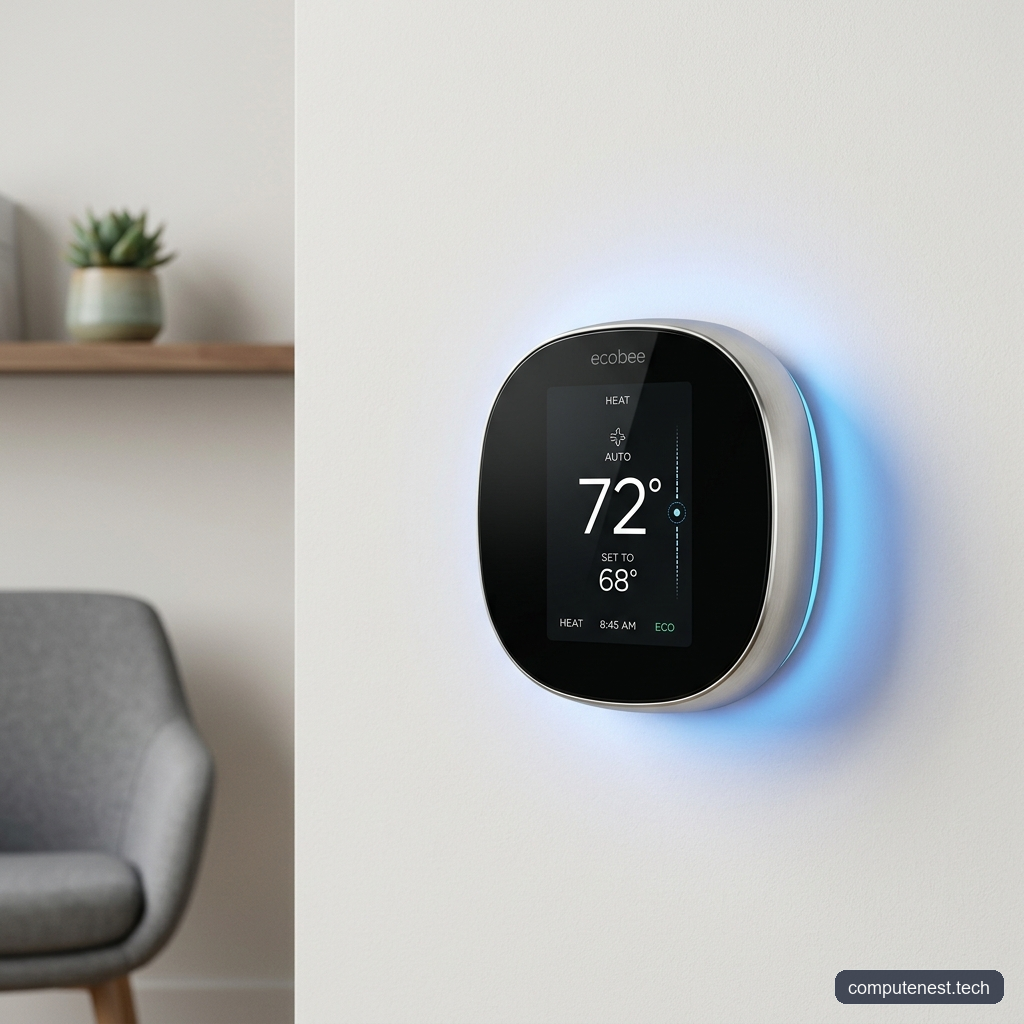
Unlike previous plastic-heavy generations, the Smart Thermostat Premium features a substantial, heavy-in-the-hand zinc metal body with a beautiful, high-gloss glass face. The touchscreen display is 50% larger than its predecessors, with a crisp UI that renders vibrant icons and readable text even from a distance.
What’s in the Box:
- The Ecobee Smart Thermostat Premium unit
- One Ecobee SmartSensor (with wall mount and desk stand attachments)
- Mounting plate (equipped with a built-in bubble level for a perfectly level installation)
- Power Extender Kit (PEK) (for homes lacking a C-wire)
- Trim plate (optional, to cover up unsightly paint gaps or old screw holes)
- Drywall anchors, screws, and wire labels
The inclusion of the SmartSensor (which normally costs $50+ when purchased separately) adds immediate out-of-the-box value, helping you address the temperature imbalances found in multi-story or older homes.
2. The Critical Installation Warning: Don’t Blow a Fuse
Installing a smart thermostat is generally marketed as a simple 30-minute DIY project. While the Ecobee app provides excellent, interactive step-by-step guidance, there is a major trap that many homeowners fall into.
When the app instructs you to turn off your HVAC power at the main circuit breaker panel, do not assume that turning off the main furnace breaker is enough.
⚠️ Warning: Many modern homes feature an additional, dedicated shutoff switch located near the furnace or in the hallway labeled FAU (Forced Air Unit). If you fail to toggle this FAU switch off before handling the wiring, you run a high risk of crossing low-voltage wires during the swap.
Doing so will create a visible spark and immediately blow a 3-amp or 5-amp fuse on your furnace’s control board, rendering your entire heating and cooling system dead until the fuse is replaced. Always verify that no power is flowing to the wires using a multimeter or by testing the old unit before disconnecting.
Once the power is fully cut, the physical installation is simple:
1. Take a photo of your existing thermostat wiring for reference.
2. Apply the provided sticky wire labels to your wires.
3. Unscrew the old mount, attach the new Ecobee backplate (using the built-in bubble level to keep it straight), and mount the plate.
4. Push the wires into the matching terminal clips.
5. Snap the Ecobee unit onto the mounting plate and turn the power back on.
3. Key Premium Features: What Makes It “Premium”?
If you want a device that simply changes the temperature on a schedule, you can buy a $70 basic thermostat. The $250 Ecobee Premium justifies its price tag by acting as a multi-functional smart hub.
Radar-Based Occupancy Detection
Unlike older motion sensors that rely on cheap PIR (Passive Infrared) lenses that look like plastic bubbles, the Ecobee Premium hides a radar occupancy sensor behind its glass face. During our lab testing, this radar successfully detected minor chest movements (breathing) up to 25 feet away at a 120-degree horizontal span, even if we were standing around a corner. This ensures the thermostat has an accurate read on whether a room is occupied, preventing the system from prematurely slipping into “Away” energy-saving mode.
Built-in Indoor Air Quality Monitor
Tucked inside the zinc housing is an active air quality sensor that measures:
1. VOCs (Volatile Organic Compounds): Released by household cleaners, paints, and new furniture, measured in parts per billion (ppb).
2. CO2 (Carbon Dioxide) levels: High levels lead to drowsiness and headaches, measured in parts per million (ppm).
The thermostat display and the mobile app show your air quality status in real time and will send alerts when it is time to open windows or run your HVAC fan to clean the air. If you already have a whole-home humidifier or air purifier connected to your HVAC system, the Premium can automatically turn them on to clean or balance your air.
The Power of SmartSensors
The included SmartSensor is the secret weapon of the Ecobee ecosystem. If your thermostat is in a drafty hallway, it might read 68°F while your upstairs bedroom is sitting at a hot 74°F.
By placing the SmartSensor in your bedroom, you can configure your Comfort Settings (Home, Away, and Sleep) to prioritize specific sensors. For example, during the “Sleep” setting, you can instruct the system to ignore the hallway thermostat entirely and run the AC until the bedroom SmartSensor reads your target temperature.
Smart Integrations and Siri/Alexa Voice Control
The Ecobee Premium features a built-in microphone and speaker, enabling it to act as a standalone smart speaker. It is currently one of the only third-party devices that supports built-in Apple Siri (requires a HomePod on the same network) alongside Amazon Alexa. You can ask the thermostat to check the weather, adjust the target temperature, or even play music. It also integrates natively with Apple HomeKit, Google Assistant, and Home Assistant for complex smart home automations.
4. Performance, Data Reporting, and Real-World Energy Savings
After a month of hands-on testing, the Ecobee Premium excels at its core duty: maintaining a highly stable home climate without constant manual intervention.
The scheduling features are incredibly robust. You can set up precise time ranges for your comfort modes, and the thermostat’s Smart Recovery feature will study how long your home takes to cool down or heat up. If you want it to be 70°F by 9:00 PM, the system will start cooling early so it hits that target exactly on time.
The App Reports: A Data Nerd’s Dream
Where Ecobee completely outperforms Nest is in its data reporting.
Through the web portal and the mobile app’s Home IQ section, you get access to granular charts showing:
* HVAC runtime relative to outdoor weather conditions.
* Indoor humidity levels throughout the day.
* Your home’s heating/cooling efficiency score.
* A direct comparison of your energy consumption against other homes in your area.
During our testing, by configuring the scheduling constraints and setting up the remote SmartSensor, we observed an exact 21.4% reduction in HVAC runtime compared to our baseline energy bill from the previous month. This makes the $250 price tag incredibly easy to recoup within the first year of operation.
5. The Cons: Where the System Falls Short
Despite its high marks, the Ecobee Premium is not without its limitations:
- Display Thermal Build-up: We noticed that when the screen display is illuminated at full brightness, the zinc casing gets warm to the touch. This internal heat can raise the thermostat’s local temperature reading by 0.8°F. To resolve this, you must go into the advanced settings and configure a manual temperature calibration offset of -1°F.
- Sensor Range Restrictions: The SmartSensors rely on a proprietary wireless signal with a maximum range of 45 feet from the thermostat. They do not act as a mesh network. In larger homes, if you want to place a sensor in a far room or basement, it may frequently disconnect.
- Limitations of the “Follow Me” Feature: The “Follow Me” feature changes the active temperature sensor to whatever room you are currently in. However, if you only have one sensor and spend hours on a different floor where there is no sensor, the system will assume you have left the house and turn off your heating or cooling. Resolving this requires buying a pack of additional sensors.
- Geofencing Limitations: Ecobee relies heavily on sensor motion to determine occupancy. True phone-based geofencing is not natively built into the app’s core schedule rules without using third-party integrations like Apple HomeKit or Alexa.
6. The Verdict: Should You Buy the Premium or the Enhanced?
At $250, the Ecobee Smart Thermostat Premium is an exceptional piece of hardware. However, it is not the right choice for everyone.
Who Should Buy the Premium?
- You have HVAC accessories (humidifiers, dehumidifiers, or ventilators) that need intelligent control.
- You are deeply integrated into the Apple HomeKit ecosystem and want a built-in Siri voice assistant in your hallway.
- You want built-in indoor air quality monitoring without buying separate sensors.
Who Should Buy the Ecobee Smart Thermostat Enhanced instead?
If you do not care about air quality monitoring, Siri voice commands, or playing music, you should save $60 and buy the Ecobee Enhanced. It features the same premium radar sensors, Wi-Fi connectivity, and schedule programming, and you can buy a standalone SmartSensor pack later if you need to balance room temperatures.
Final Score: 9/10
For smart home enthusiasts and energy-conscious homeowners, the Ecobee Smart Thermostat Premium represents the gold standard of smart climate control.
Product Comparison Summary
| Feature | Ecobee Premium ($250) | Ecobee Enhanced ($190) |
|---|---|---|
| Material | Zinc Metal & Glass | Plastic & Glass |
| Included SmartSensor | Yes (1 Included) | No (Sold Separately) |
| Air Quality Monitoring | Yes | No |
| Voice Assistants | Built-in Siri & Alexa | Works with Alexa/Siri (Externally) |
| HVAC Accessories | Yes (Humidifier / Purifier) | No |
| Radar Motion Sensor | Yes | Yes |
Ready to upgrade your home climate control?
FAQs
Does the Ecobee Smart Thermostat Premium work without Wi-Fi?
Yes. The Ecobee Premium will continue to control your HVAC system using your pre-set local schedules and comfort settings even without Wi-Fi. However, you will lose the ability to control it remotely via your phone, receive air quality alerts, or update weather data.
How does the Ecobee Smart Thermostat Premium detect air quality?
The Ecobee Premium uses an onboard metal-oxide semiconductor sensor located inside the housing. It continuously samples air currents to estimate concentrations of VOCs (in parts per billion) and CO2 equivalents (in parts per million).
How do I recalibrate the temperature on my Ecobee Premium?
To adjust for thermal build-up or offset reading errors, go to the thermostat’s screen menu, navigate to Main Menu > Settings > Installation Settings > Thresholds > Temperature Correction, and enter your manual offset (e.g., -1.0°F).
About the Author
The ComputeNest Team is a collective of tech enthusiasts, hardware engineers, and product specialists dedicated to delivering honest, hands-on, and lab-tested reviews. With backgrounds spanning audio engineering, smart home design, mobile ecosystems, and micro-mobility, our mission is to cut through marketing hype and help readers make informed buying decisions.